
Define the work
Name the owner, the waiting rule and the evidence that closes a request before drawing its workflow.
9 prompts with an equipment-request example
Workflow brief (CSV)Preview the worksheetThe workflow field kit
A product demo is easier to assess when you bring a request that can go wrong. These three editable worksheets connect a service brief to acceptance checks and an integration handoff. Start with the filled equipment-request example, then replace its assumptions with your own.
CSV downloads · Filled examples · No signup
Name the owner, the waiting rule and the evidence that closes a request before drawing its workflow.
9 prompts with an equipment-request example
Workflow brief (CSV)Preview the worksheetTake a repeat delivery, a missing approver and a canceled request into your next product demo.
8 scenarios with space for observed results
Demo evidence sheet (CSV)Preview the worksheetDecide which system owns each value and how an operator will resolve an uncertain result.
6 decisions with blank agreement fields
Integration contract (CSV)Preview the worksheet01 / Workflow brief
The requester needs equipment. The service desk needs a complete request, the manager makes a decision and the asset team needs authority to allocate a device. A status change alone does not tell the next person what to do.
This fictional example defines requirements for a pilot. Adjust the roles and waiting rules to your organization, then verify the behavior in your chosen configuration.
Declined and Canceled are separate end states. An overdue approval stays unapproved until an authorized person makes the decision.
What observable result closes the request?
A laptop is assigned and acknowledged, or the request ends with a recorded reason.
Where does this workflow start and stop?
Start when the employee submits a request. Stop at acknowledged handover, rejection or cancellation.
Who owns the next action at each handoff?
The service desk checks the request, the line manager approves and the asset team allocates equipment.
Which missing values prevent a useful decision?
Request ID, requester ID, customer ID, device type and required-by date.
Which transitions are allowed, including terminal states?
Requested to Awaiting approval to Ready for allocation to Handed over. Declined and Canceled are alternative end states.
Who may approve, allocate or cancel?
The line manager approves before the asset team allocates. A requester may cancel before allocation.
Who acts when the expected response does not arrive?
After one business day awaiting approval, the service desk follows up with a named substitute approver. Silence does not authorize allocation.
What record proves the work reached an end state?
Keep the asset serial and recipient acknowledgment for handover, or the reason for rejection or cancellation.
Who handles work that cannot follow the normal path?
The service desk owns requests with unavailable equipment and records the next action instead of leaving an unassigned queue item.
The download adds a blank Your workflow column beside this example. Fill it with one process before mapping a second. For the product concepts behind the brief, see workflow automation and CMDB records.
02 / Demo evidence sheet
Use the same sample request throughout the demo. Agree on the expected result before testing, then record what actually happened. Keep the result as Not tested until someone observes it; use Pass, Fail or Blocked afterward. A blocked test still needs an owner.
| Try this | Required result | Keep as evidence |
|---|---|---|
| D01Submit a complete request | The request has an owner and awaits approval before any equipment is allocated. | Request ID, initial state and assigned owner. |
| D02Omit a required customer identifier | The request is held for correction before allocation. The missing value is identified. | Validation response and unchanged allocation record. |
| D03Use another customer's request ID | An identity without permission cannot read or change the other customer's request. | Read and update results from both test identities. |
| D04Deliver the same request twice | The agreed duplicate policy prevents a second allocation for the same business operation. | Both attempt IDs, the shared operation key and the allocation count. |
| D05Reassign a request awaiting approval | The new owner sees the pending action. Reassignment preserves the approval state and prior history. | Before-and-after owner, state and event history. |
| D06Cancel before allocation | The workflow records cancellation and does not allocate equipment afterward. | Cancellation event and a later allocation check. |
| D07Leave the approver unavailable | The agreed waiting rule gives a named person the follow-up. It does not silently approve the request. | Configured waiting rule, follow-up owner and approval state. |
| D08Lose the allocation response | The operator can establish whether allocation happened before deciding to retry. | Operation key, status lookup or stored result, and the retry decision. |
Mark the checks that must pass before a pilot can proceed. For example, a successful handover does not compensate for a failed customer-access check. The CSV has separate columns for observed behavior, evidence location, result, owner and follow-up.
Build the access scenarios with test identities and records you control. OWASP's authorization guidance explains why permission checks must cover each request, including direct API calls.
03 / Integration contract
Connecting a service request to an asset system introduces another handoff. A shared field name is not enough: both sides need to agree on identity, authority and what happens when the result is uncertain. Use this sheet with the actual endpoint documentation.
| Decision | Question to resolve | Equipment-request example |
|---|---|---|
| Business identity | Which key identifies one operation across deliveries? | Use the customer ID with the source request ID. Keep that identity on a retry; a new key means a new operation. |
| Customer authority | Where is customer scope verified? | Compare the requested customer with the authenticated integration identity's permitted scope before reading or writing. |
| Field ownership | Which system is allowed to change each value? | The service workflow owns approval state. The asset system owns the allocated serial. Name the writer for every shared field. |
| Value mapping | What do field values mean at each end? | Write down how device types and dates map. Keep requested, allocated and handed-over states distinct instead of collapsing them into done. |
| Uncertain result | How will a caller resolve a timeout after a possible write? | Agree on a status lookup or replayable result before retrying allocation. A missing response alone does not establish that nothing happened. |
| Operator handoff | What happens when automatic processing stops? | Route the request ID, failure reason and next action to a named owner. Set a condition for resuming work after correction. |
The CSV adds fields for your agreement, its owner and supporting evidence. For retry behavior, check HTTP's idempotency rules alongside the service's own contract. Dreamtsoft's REST integration overview provides the route into platform-specific documentation.
If shared field meanings change, test old and new readers against the changed event schema. The compatibility example includes replaying an older payload after a reader update.
Follow the evidence
Run the SQLite example to distinguish a lost response from an operation that never committed.
Explore six retry casesTurn the access check into an explicit matrix of identities, resources and allowed actions.
Build a permission matrixDefine a durable job's states and the status a caller can inspect after the initial response.
Examine the async job contractInside Dreamtsoft
Explore three views of the platform. Select any screenshot to inspect it at full size. The records and figures shown are demo data.
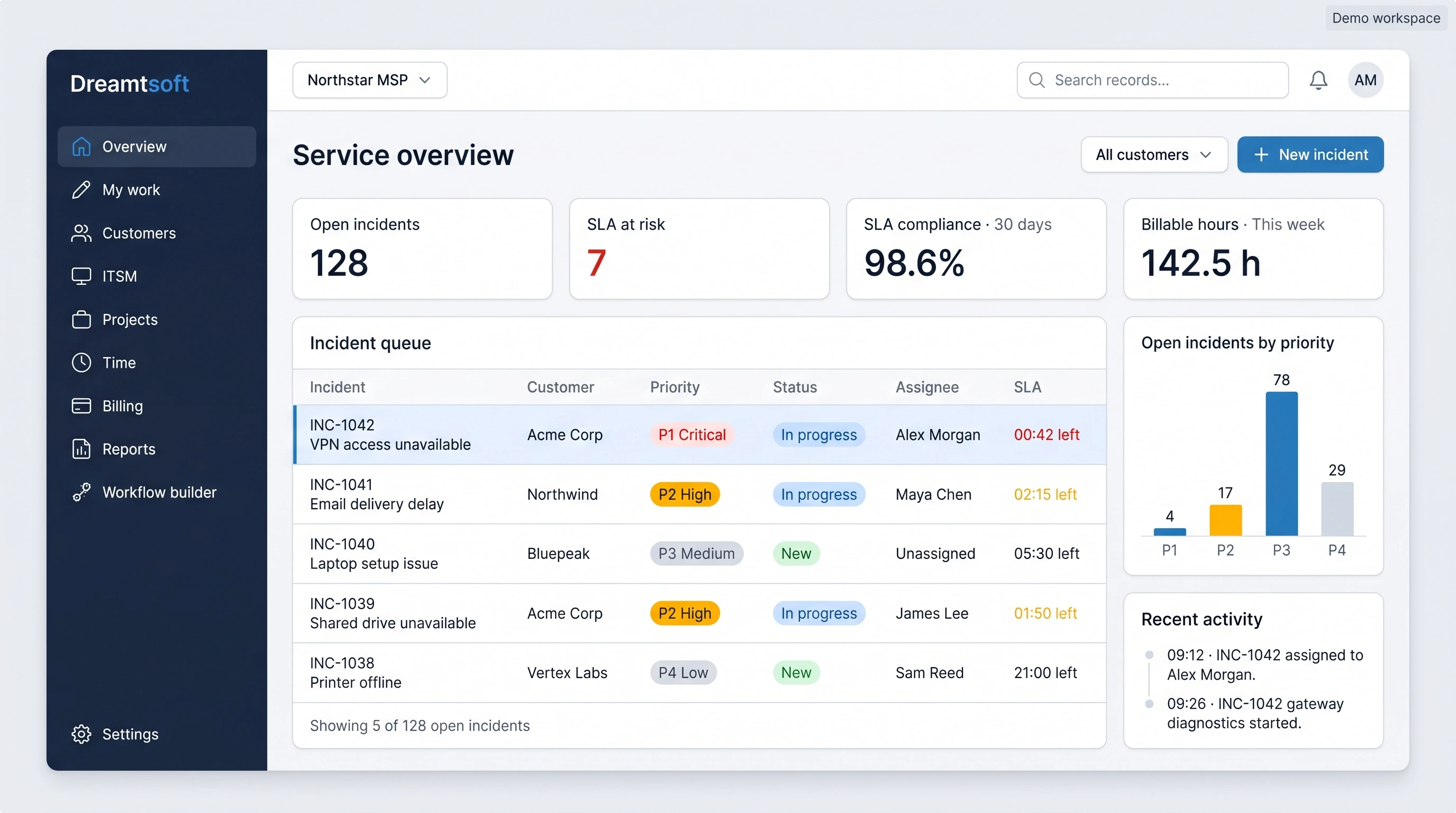
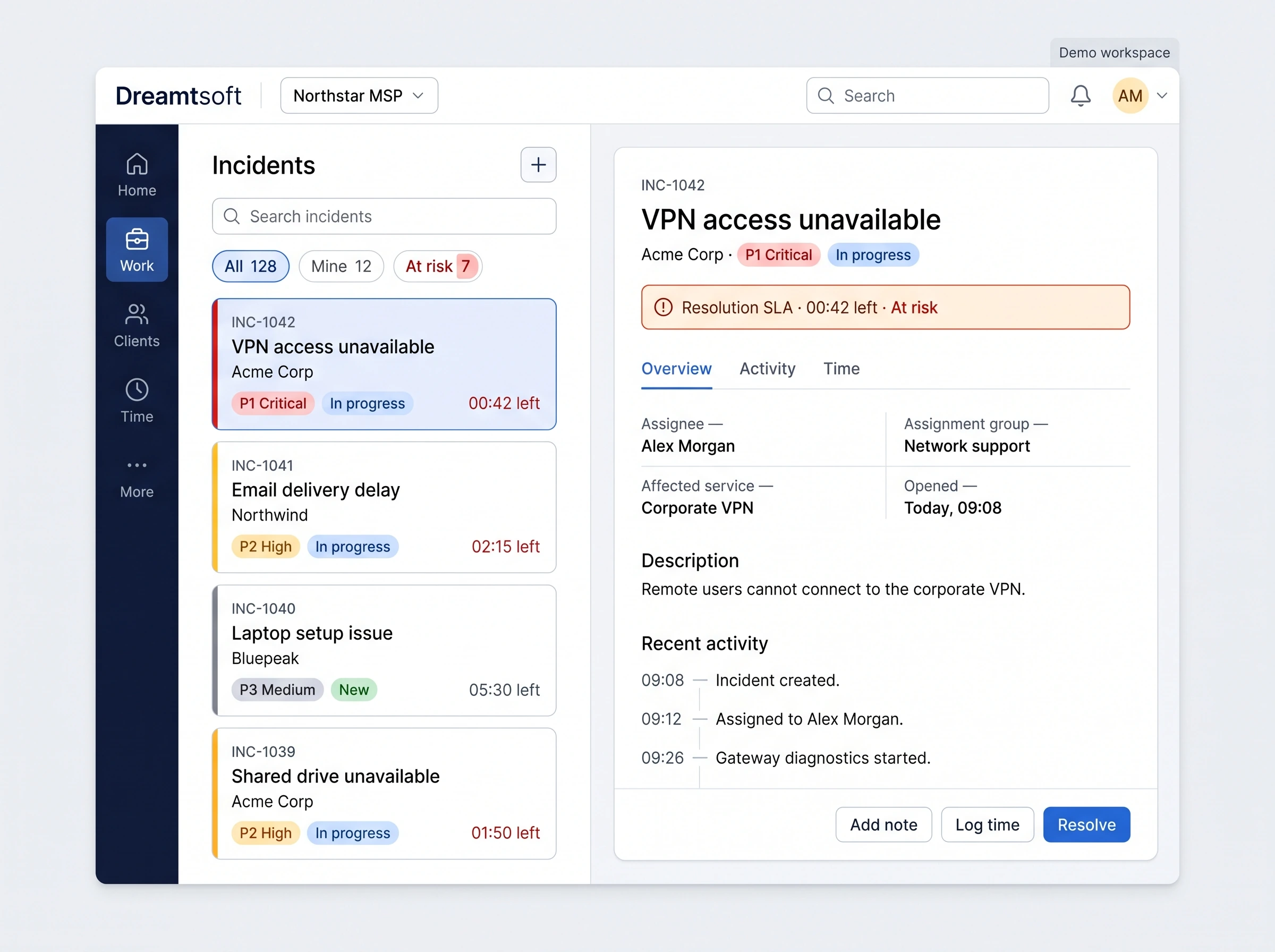
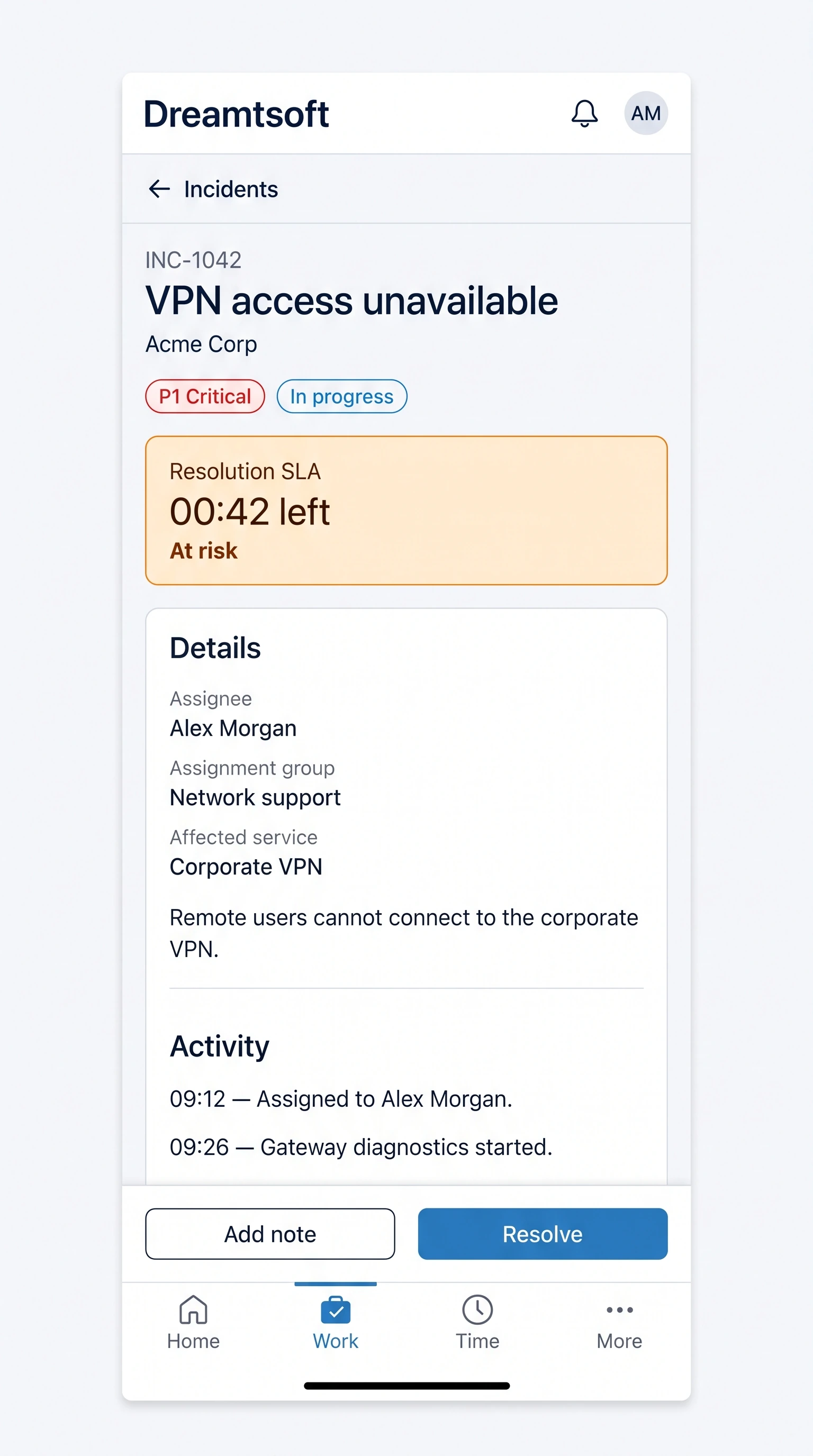
Product library
A 50-second product video with a complete timestamped on-screen transcript
Watch the ITSM video and read the transcript →A 62-second product video with a complete timestamped on-screen transcript
Watch the MSP video and read the transcript →A mix of promo videos, technical walkthroughs and everything in between
Watch Dreamtsoft videos →Dreamtsoft's formal documentation repository. Primarily useful for Platform developers and those looking for the deeper (more technical) elements of Dreamtsoft (for now)
Browse the technical Wiki →A one page summary of what Dreamtsoft is all about
Read the one-page overview →A one-page company overview created in May 2019
Read the company overview →A two-page ITSM and platform brief created in March 2019
Read the ITSM brief →Product pages
Tell us which request you need to manage, who owns its next action and where the current handoff breaks down. Use your worksheet to frame the conversation and identify what you need to verify in a demo.