

The connection recovered. The count did not.
An operations dashboard shows three completed jobs. The server has recorded five. The browser is receiving events again, and the latest ID on both sides is 45. What went wrong?
In our local Chromium fixture, the browser received event 41 and the server ended the HTTP response. On the automatic reconnect, the browser sent Last-Event-ID: 41. Events 42 and 43 were outside the retained replay window. The server selected the remaining events with IDs greater than 41, sent 44 and 45 and let the client look current. Since each event adds one, the counter stayed at three.
Compare the final state with the authoritative state when testing a reconnect. The fact that both sides show ID 45 says nothing about the events between the last saved position and the first replayed event.
Decide whether the retained log can answer the cursor
The HTML Standard's reconnect rules explain how an EventSource sends its remembered event ID when it reconnects. The server still owns the replay policy. A remembered ID is a transport position, so it cannot certify that an application durably applied every earlier update.
For the fixture's contiguous stream, a cursor of 41 can resume when the oldest retained event is 42. Keeping the cursor's own event is unnecessary when the next required event is available. If the oldest is 44, two required positions are missing. Rejecting every cursor below the oldest retained ID would resync the first case unnecessarily. Filtering only for IDs greater than the cursor silently accepts the second.
Real SSE IDs are strings. Do not subtract one from opaque cursors or infer loss from holes in a filtered or sparse sequence. Define continuity against the same authorized subscription and stream generation, using your log's retention boundary or explicit cursor lookup. Reject a cursor from another scope or an unrecognized future position instead of treating it as a request for an empty suffix.
Pair a reset with a state cut
When continuity cannot be established, our endpoint sends a named reset event with the reason in its payload. Omitting the id: field prevents the control frame from introducing a new replay ID. The handler closes the old source before requesting a snapshot. This is an application convention, not a standardized SSE event type.
Return state and a cursor that describe the same cut. In the fixture, the snapshot records a count of five through event 45. Event 46 commits after capture and before the client opens the new source. The client replaces its local state with the snapshot, then asks for events after 45. It receives 46 and reaches six.
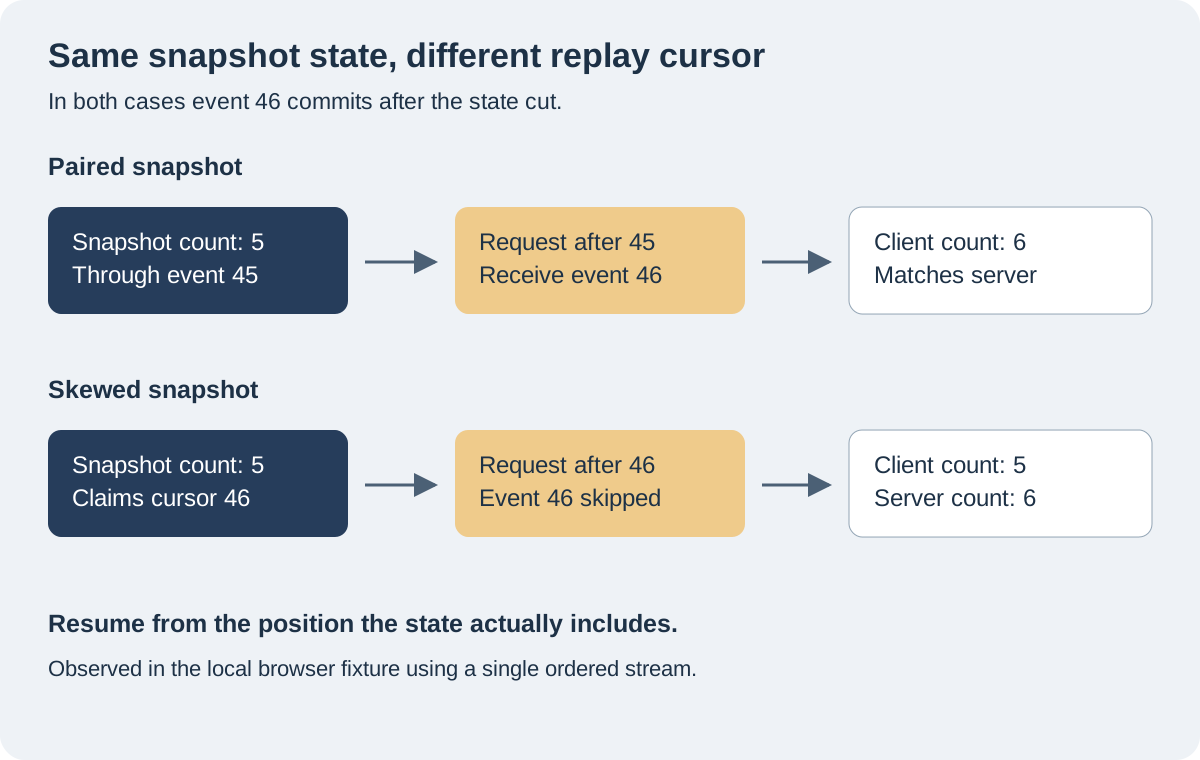
A common mistake is to read the state first and ask the log for its latest position afterward. Our negative control does exactly that: it returns the count of five with cursor 46. Replay starts after 46, so the update never reaches the client. Even after the new connection opens, the client remains at five while the server is at six.
A materialized view can lag the log even if both reads occur close together. Return the view's applied-through watermark with the view data. The backing store must guarantee that the snapshot includes all the changes through that point and excludes later changes that replay would apply again. Use a cursor still covered by retention, or be prepared to repeat resynchronization with a bounded retry policy.
Open a fresh stream at the snapshot position
The native EventSource constructor accepts a URL and a credentials option. It does not expose a custom headers option for setting a starting position. The fixture puts the snapshot cursor in an explicit after parameter. The server observed no Last-Event-ID on the first request from the new object. That differs from the automatic reconnect of the old object, which carried 41.
If the endpoint also accepts automatic reconnects, document how the header interacts with the original starting parameter. Our server reads the header first when present. Scope and validate both inputs; a cursor in a URL is not an authorization credential. Keep secrets and sensitive identifiers out of that parameter.
The switch from replay to live delivery also needs a boundary. A reader that queries the suffix and only then subscribes to new writes can miss an event in between. Use one ordered reader that can continue from the replay end, or register a live subscription first and buffer overlapping updates until replay catches up. A production example is Unabated's documented snapshot and buffered-update flow. A bounded buffer and an application-level deduplication rule belong to that design.
Four native browser runs
The runs use a single synthetic counter. Each application event adds one. The server exposes a finite completion marker for the test so the assertion does not depend on waiting a guessed amount of time.
| Scenario | Event IDs received | Client / server count |
|---|---|---|
| Retained edge | 41, 42, 43, 44, 45 | 5 / 5 |
| Unchecked gap | 41, 44, 45 | 3 / 5 |
| Paired snapshot | 41, 46 | 6 / 6 |
| Skewed snapshot | 41 | 5 / 6 |
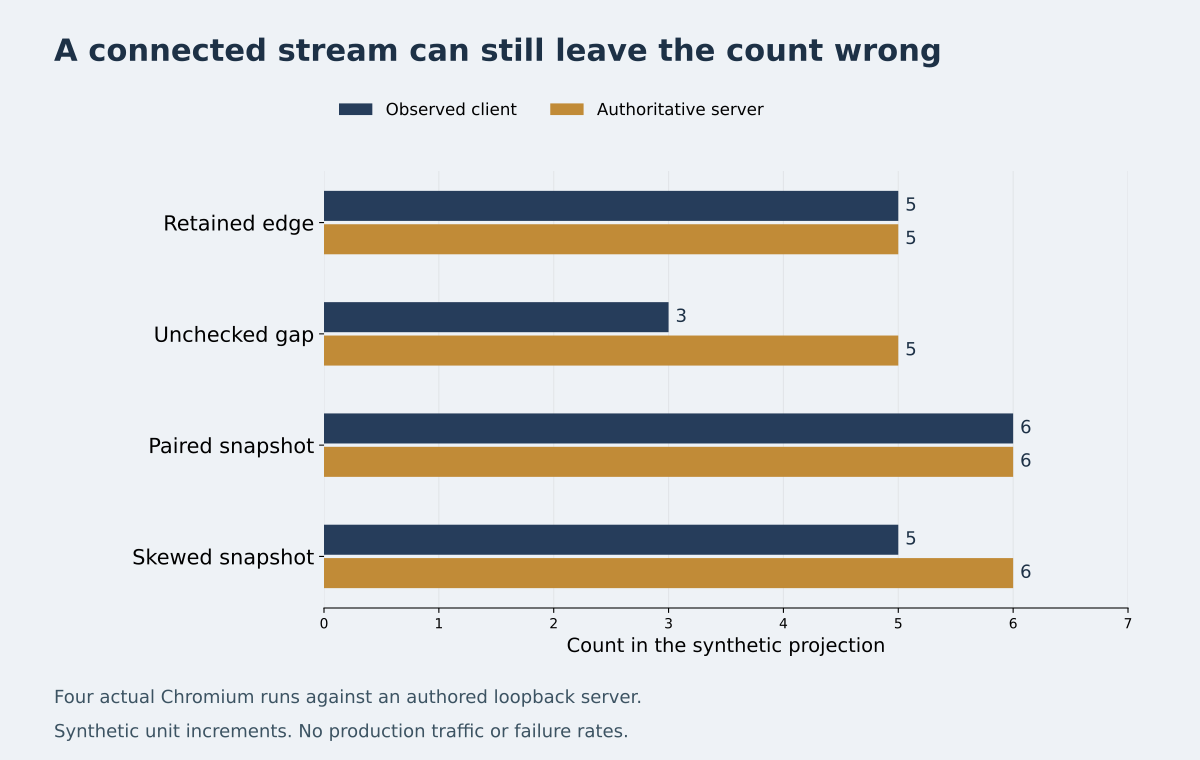
With a paired snapshot, the client rebuilds the count without receiving events 42 through 45 individually. That is sufficient for a current-state dashboard. If each missing event is a required audit record or triggers a side effect, a snapshot cannot replace it. That consumer needs a durable replay path or an explicit failure it can act on.
Download the Node.js and Playwright fixture and the raw JSON traces. In a disposable directory with Node.js and Playwright installed, install Playwright's Chromium and run node experiment.mjs. The published run uses Node.js 24.20.0, Playwright 1.62.1 and Chromium 151.0.7922.34. The fixture binds to loopback and uses actual browser requests. It does not test proxy buffering, a distributed log or production reconnect rates.
Make the continuity check a release condition
Exercise the boundary in both directions: retain the next needed event and prove that replay succeeds, then remove it and prove that the server does not silently advance the client. Test state replacement with a commit between snapshot capture and subscription. Compare the resulting projection with a separately read authoritative value. For a feed with mandatory historical delivery, assert the exact delivered IDs as well.
When testing a deployment, repeat the same sequence across a process restart or instance change and with the real subscription filter. Capture the cursor received at the server, the retained boundary and the snapshot watermark. Those observations tell you which guarantee broke when a green connection indicator is the only thing the dashboard got right.
Sources
Documentation checked .
Continue the conversation
Comments (0)